


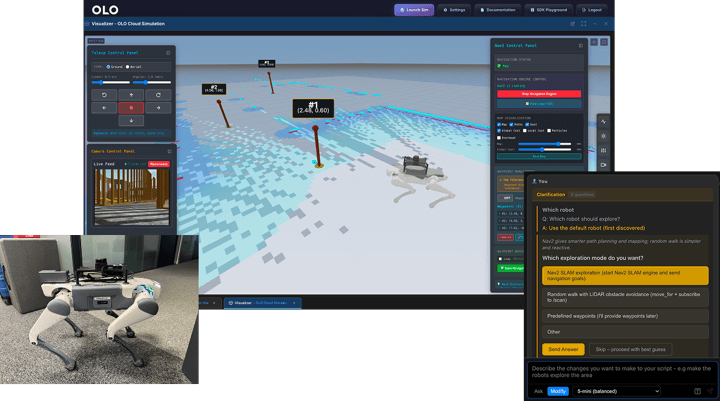
ROS 2 is a powerful, mature framework, but the tooling required to work with it has historically been built for specialists. Before writing meaningful application logic, a developer can spend days or weeks on setup, networking, visualisation, simulation and deployment. This means sourcing a ROS 2 distribution, handling DDS middleware, setting up rosbridge, configuring tools such as MoveIt 2, Nav2, RViz and Gazebo, writing custom launch files, and configuring robot drivers. Much of that setup then needs rebuilding every time a new robot model or environment is introduced.
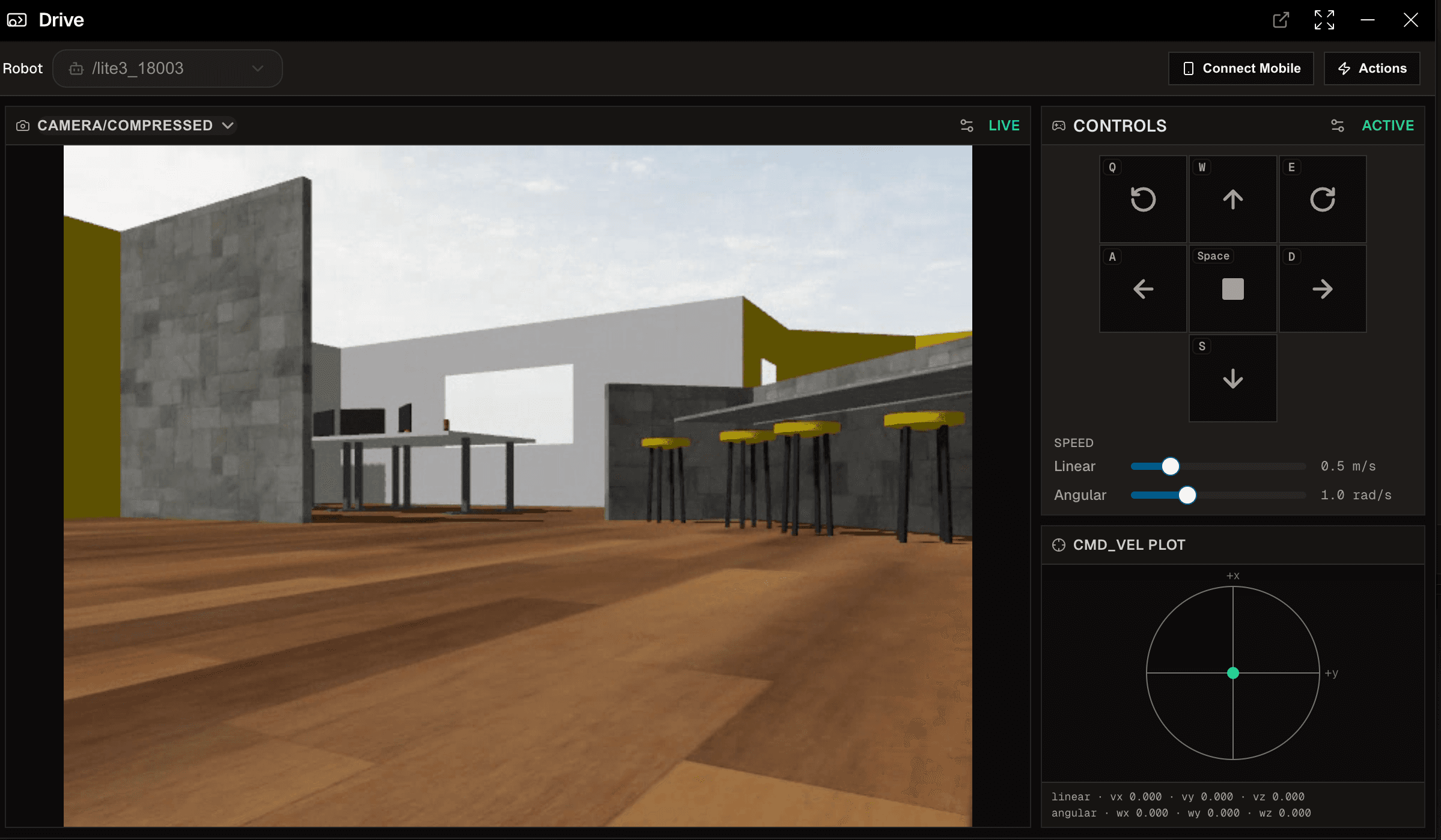
OLO is a browser-based platform built directly on ROS 2, designed to remove that infrastructure overhead without abstracting away the framework itself. ROS 2, Gazebo, Nav2, MoveIt 2 and RViz all remain in place. OLO packages access to that ecosystem into a single browser-based workflow for robots, simulations, telemetry, video and code.
Here’s how the architecture works, and what it looks like in practice across two hardware integrations, DEEP Robotics’ quadrupeds and Fiction Lab’s Leo Rover.
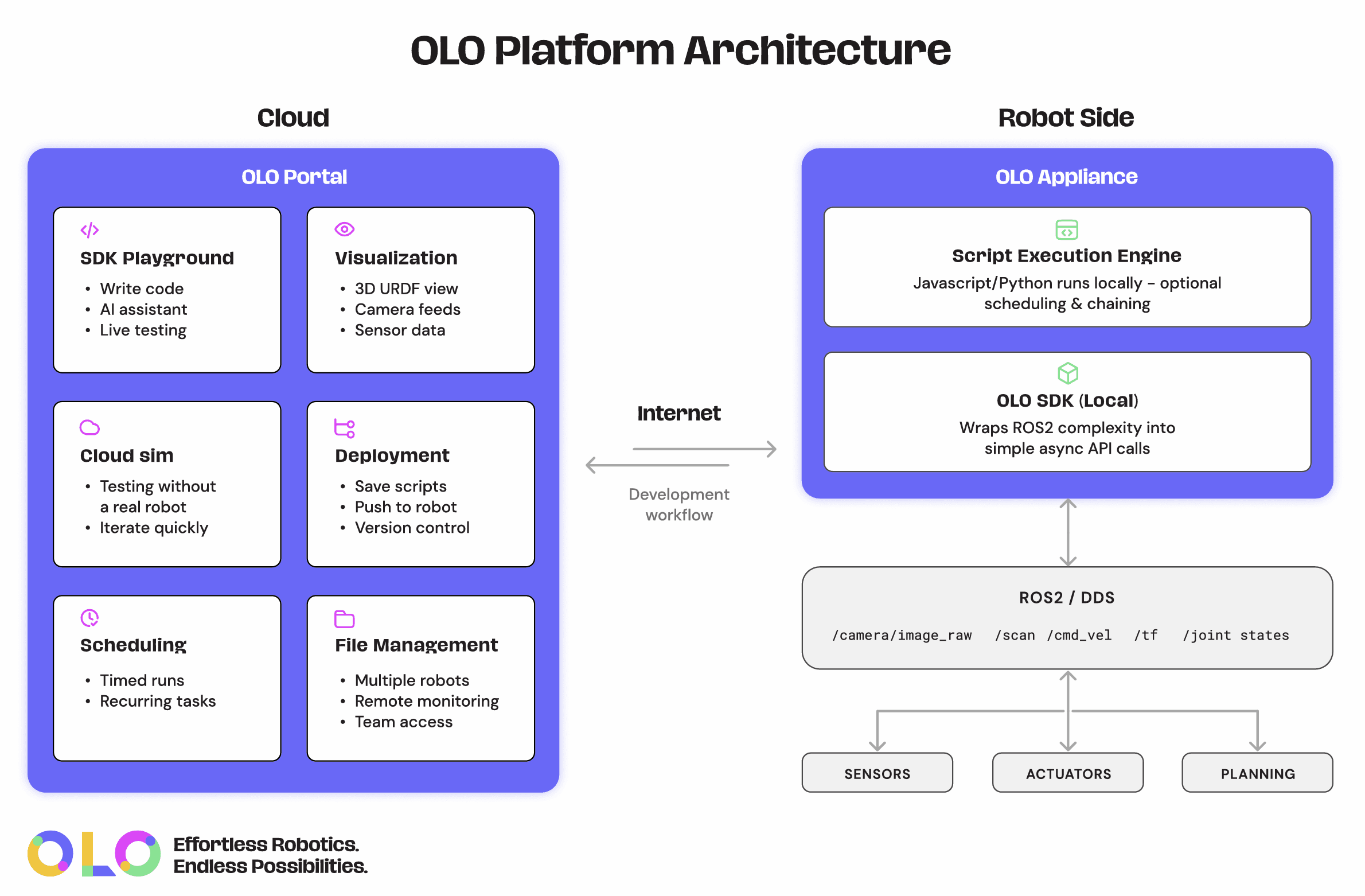
The appliance bridges ROS 2 to the browser
The connection between a robot and OLO is handled by what we call the appliance. This is robot-side software, available as a Docker container or pre-configured hardware, that bridges ROS 2 to the OLO portal and executes code locally.
Local execution is important because OLO isn’t simply a remote-control web interface dependent on an open browser tab. Code runs on the appliance, close to the robot and on the same network as the ROS 2 graph, so scripts, scheduled jobs and robot-side behaviours continue operating locally even when cloud connectivity is intermittent or unavailable.
Once the appliance is running on the same network as the robot, any ROS 2 topics it broadcasts appear automatically in the platform, with a full topic and node explorer visualising the data and publish-subscribe relationships, without custom bridging code. The OLO SDK provides a higher-level API over ROS 2 operations covering topic management, robot control, navigation, joint control, planning scene management and vision analysis, while still exposing direct ROS 2 access for developers who need it.
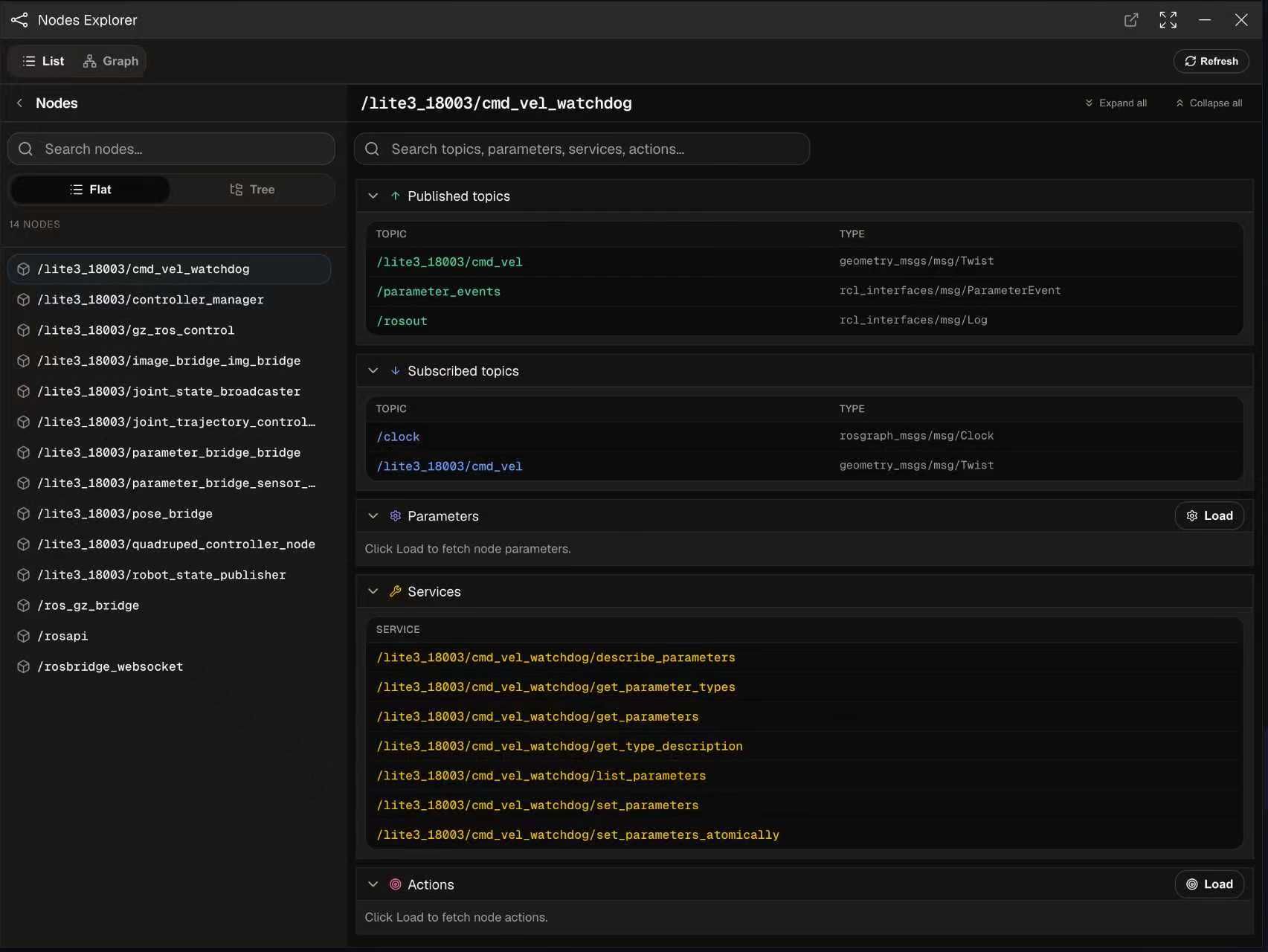
This reduces the bespoke engineering required for hardware integrations. Because OLO is built on ROS 2 itself rather than a proprietary layer on top of it, any robot or ROS 2 network already broadcasting ROS 2 topics is visible to the platform. Different robots still expose different topic names, services, actions, coordinate frames and command semantics, so discovery doesn’t mean full control without configuration. But where a robot exposes standard ROS 2 interfaces, OLO can discover, visualise and interact with much of that interface immediately, with robot-specific profiles sitting above the discovered ROS 2 graph for richer control.
On ROS 2-compatible DEEP Robotics platforms, for example, the appliance picks up the robot’s existing topics, joint states and sensor feeds, presenting them in the topic explorer. A simple example of subscribing to a quadruped’s joint state topic through the SDK, in JavaScript, looks like this:
await oloClient.core.subscribe('/joint_states', (msg) => {
console.log('Names:', msg.name);
console.log('Positions:', msg.position);
console.log('Velocities:', msg.velocity);
console.log('Effort:', msg.effort);
});
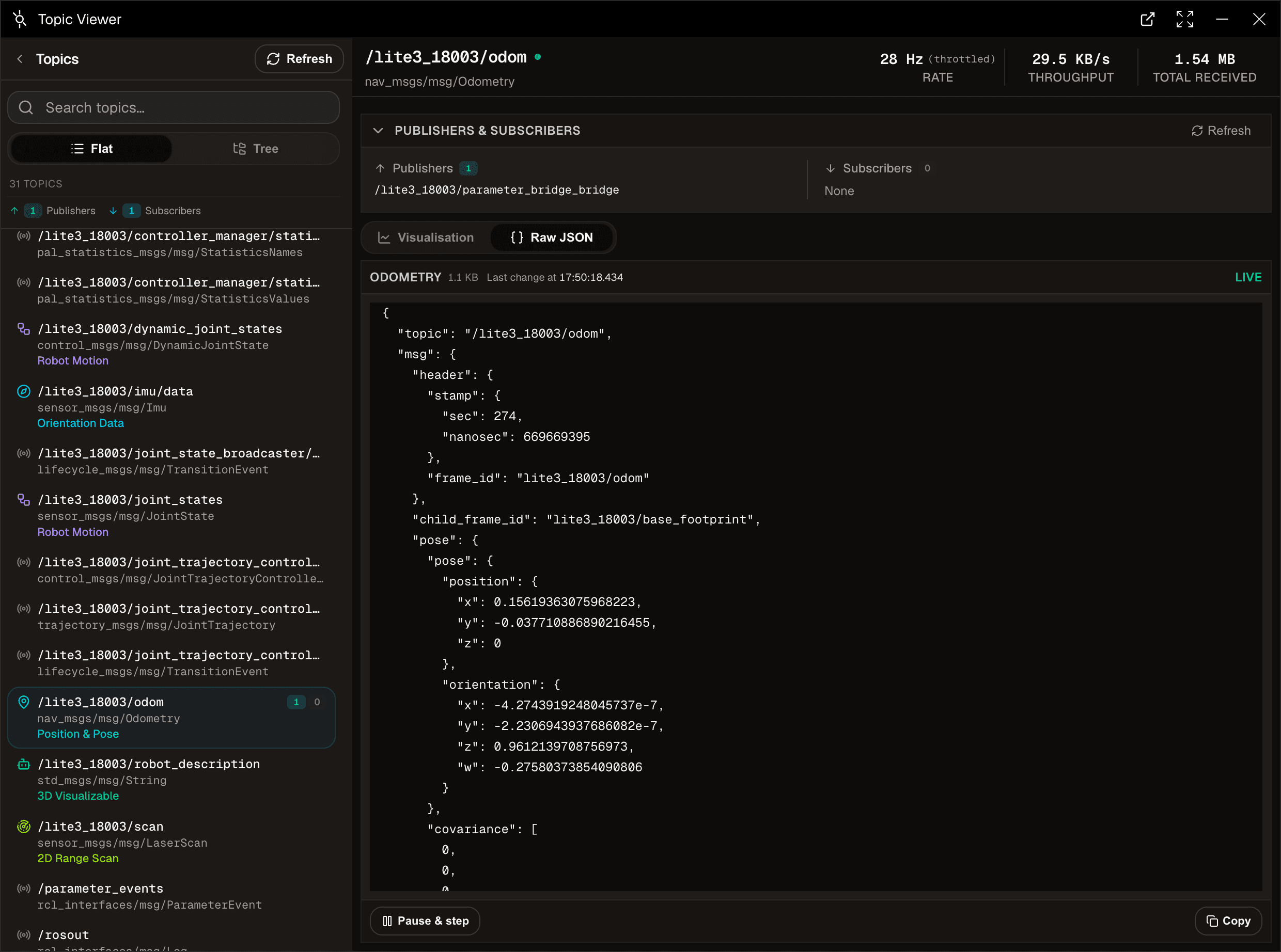
The same pattern applies regardless of robot type. The SDK call doesn’t change based on whether the underlying hardware is a legged platform or a wheeled rover, because the abstraction sits at the ROS 2 level rather than the robot level. The robot-specific work is then about mapping that robot’s capabilities properly, not rebuilding the development environment from scratch.
Cloud Sim and the sim-to-real workflow
For development before hardware is available or shipped, OLO offers Cloud Sim. The appliance is automatically provisioned, with the platform spinning up a simulated robot environment and connected virtual appliance, so the developer sees the robot’s digital twin in the visualiser immediately, with no installation step.
The simulation runs in the cloud, with Gazebo handling the physics, and OLO presents the live robot state through its browser-based visualiser, with a catalogue of indoor and outdoor environments. Objects can be pulled into the scene from the online Fuel catalogue, with their physical properties adjusted to test how a robot responds to its surroundings.
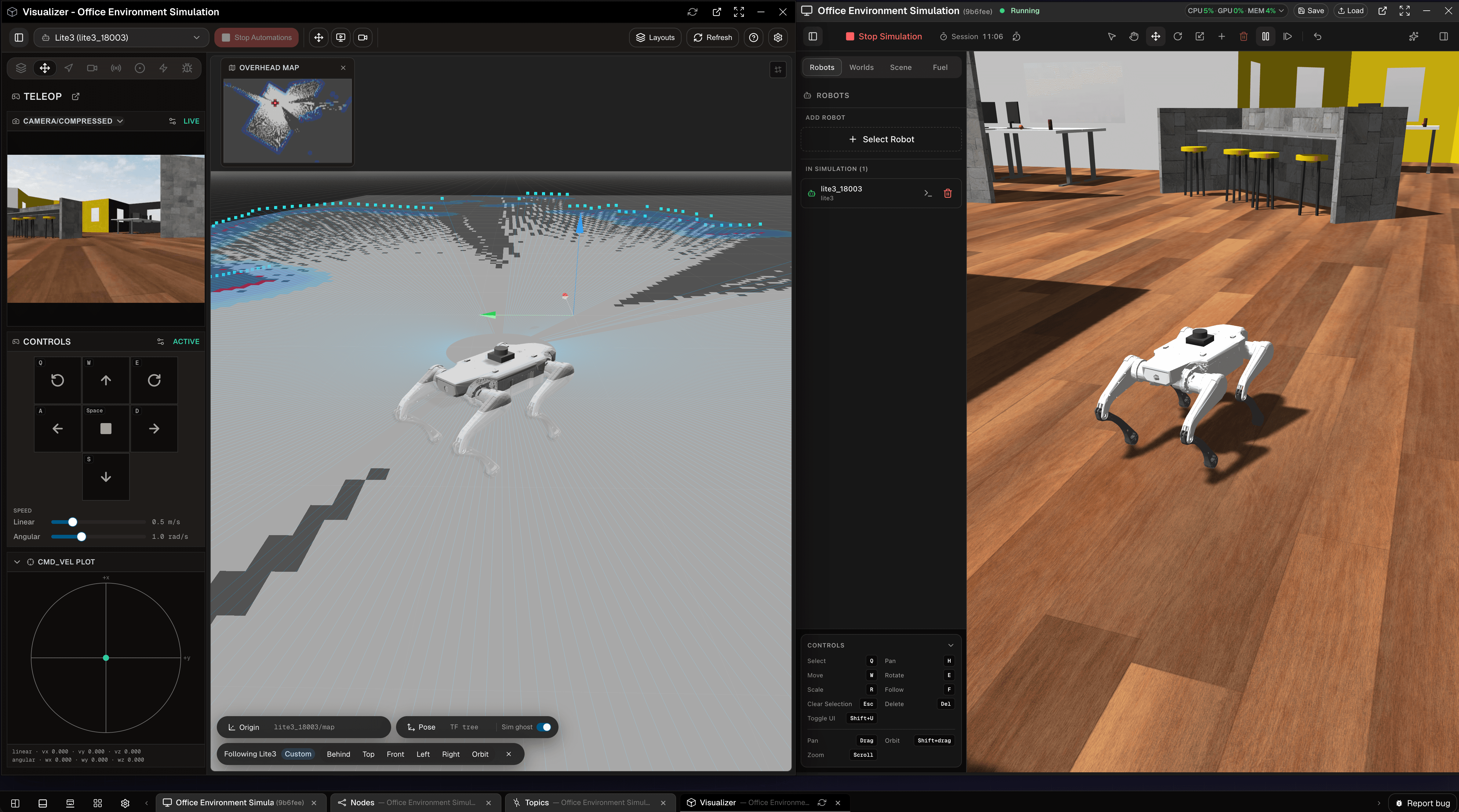
This is purpose-built for testing, kinematics, navigation and application development rather than large-scale reinforcement learning, and isn’t a substitute for AI training environments such as Isaac Sim, though that’s an area we’re investigating. What matters for the sim-to-real workflow is that the same SDK and code run in both the simulated and real environments. A developer working against a Leo Rover’s digital twin in Cloud Sim writes against the same topics, services and SDK calls they’ll use once the physical rover arrives, with no reconfiguration step between simulation and deployment, because the underlying interface remains ROS 2.
In practice, a customer ordering a Leo Rover bundled with OLO can begin development the day they place the order, testing navigation and manipulation logic in simulation before moving directly into deployment when the hardware arrives. We test every supported robot extensively from simulation through to real hardware, though the usual caveats of moving from simulated to physical environments still apply, and simulation remains a development accelerator rather than a guarantee every real-world variable has been captured. Several OEM and distributor partners are now using the simulation as a try-before-you-buy environment for prospective customers ahead of any hardware purchase.
Recording, replay and debugging
Robotics problems are often hard to reproduce. A robot behaves unexpectedly, a sensor stream drops, a navigation command fails, or a camera feed doesn’t line up with the robot’s state, and if the only record is what an operator saw in the moment, debugging becomes guesswork.
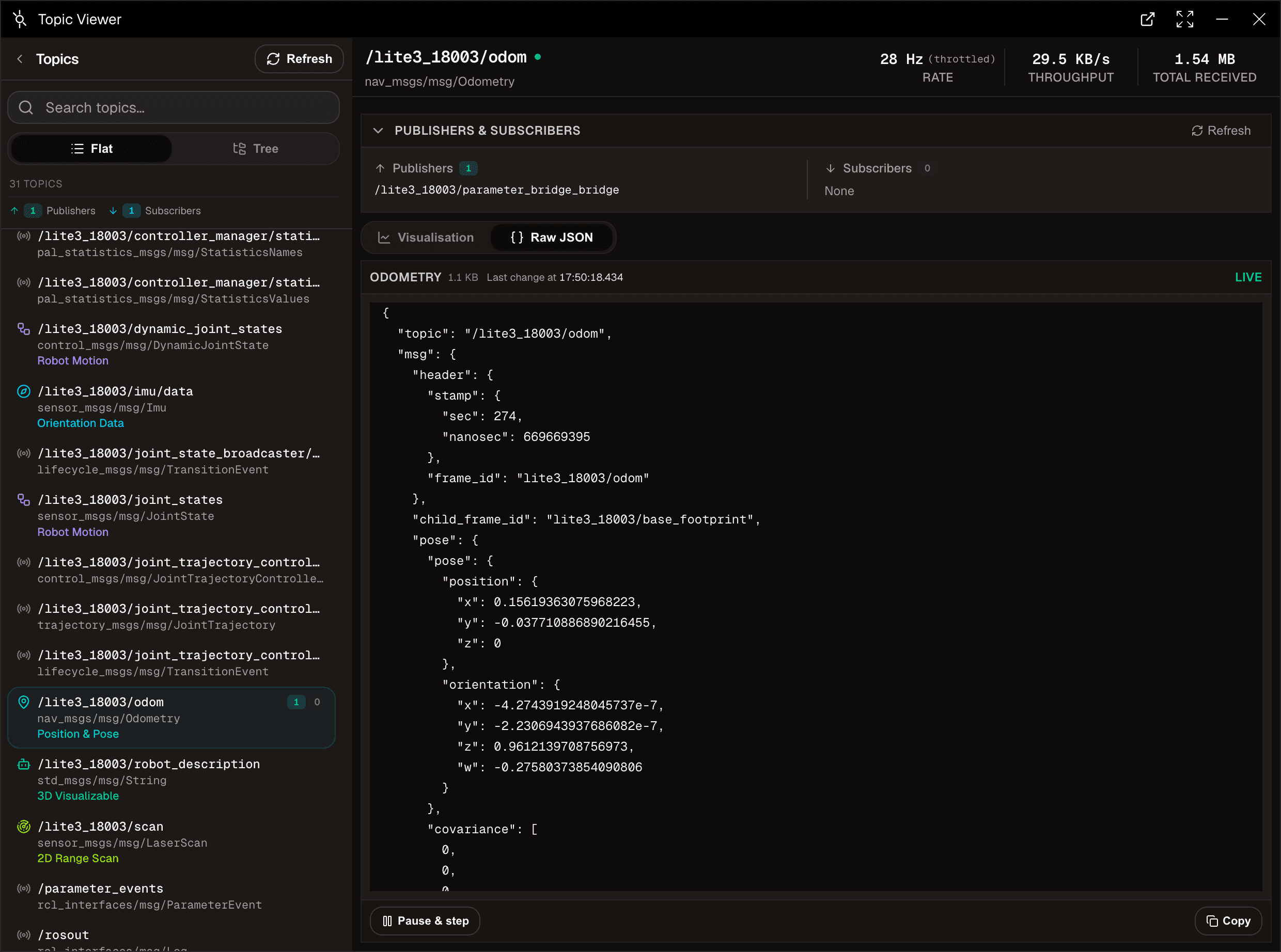
OLO makes recording and replay part of the normal workflow. Topic data, telemetry, video and robot events can be captured so teams can review what happened after the fact, both during development and once robots are operational. A failed test, an edge-case behaviour or a support issue can be investigated using the same browser-based environment used to build and control the robot. This also strengthens the sim-to-real workflow, since developers can compare simulated behaviour with real-world runs, inspect differences in sensor data, and replay sessions when tuning control logic or diagnosing faults, bringing simulation, operation and debugging into a continuous loop.
AI-assisted coding, with full transparency
On top of the SDK sits AI-assisted coding. A developer can describe what they want in natural language and receive working Python or JavaScript, generated by an assistant grounded in OLO’s documentation and SDK examples. None of this is a black box. Any code the assistant writes is reviewable, with changes, omissions and additions clearly highlighted, and developers can test the code before applying it.
That transparency matters when robotics code interacts with physical systems. The aim is to accelerate the repetitive parts of working with ROS 2 while leaving the developer in control, able to inspect generated code, understand which topics, services or actions are being used, and modify it directly when needed. OLO provides a higher-level interface where that helps, without removing access to the underlying ROS 2 system.
Handling live robot data from the browser
A browser-based platform raises an obvious question around responsiveness, particularly for teleoperation, video and live sensor data. OLO treats different types of robot data differently rather than forcing everything through a single channel. Commands, telemetry, topic data, sensor streams and video each have different requirements around reliability, latency, compression and adaptability to network conditions, and OLO manages those differences behind the scenes so developers and operators can work from a browser without designing the networking layer themselves.
The appliance plays an important role, sitting close to the robot. It communicates locally with the ROS 2 environment, manages the flow of data back to the portal, and avoids exposing the robot’s ROS 2 network directly to the public internet. Where connectivity is limited, data can be filtered, reduced or prioritised so the operator still sees what matters. In practice, a user can open a browser tab, inspect live robot state, view video, send commands and monitor telemetry without needing to understand the underlying transport mechanisms, while the platform still respects the realities of bandwidth, latency and network security.
Taken together, the appliance, the cloud simulation environment, recording and replay, live data handling, and AI-assisted coding function as a single continuous pipeline rather than separate tools bolted onto ROS 2. A developer can move from a digital twin to physical hardware, and from a natural language description to reviewable production code, without changing the underlying interface at any stage. For OEMs and distributors, that translates into a practical route to adoption. Customers can try a robot in simulation before buying it, developers can begin writing code before the hardware arrives, and support teams can inspect telemetry and replay sessions without recreating a customer’s environment. That continuity, rather than any single feature, is what determines how quickly a robotics integration reaches deployment.


Leave a comment