


Onshape was given a supplier's bushing catalog and a few lines of instructions. Thirty-four minutes later it had a new CAD command that builds every bushing in the catalog. Darren Henry of PTC's Onshape business walked RobotToday through the AI behind it, and the parts of it aimed at robot builders.
PTC Onshape at IMTS 2026
Company | Onshape, the cloud-native CAD and PDM platform of PTC Inc. (Nasdaq: PTC), Boston, Massachusetts |
On the stand | Live design-to-production demos and an in-booth theater. Onshape CAD and PDM, CAM Studio, Simulation, PCB Studio, Render Studio, MBD, Custom Features, AI Advisor, Onshape Vision and Onshape Labs |
AI program | Onshape Labs, opened July 14, 2026 as an early-access program. AI Quick Render and Onshape-to-Isaac Sim workflows are in it now |
New this summer | FeatureScript MCP Server, launched Aug. 13, 2026 through Onshape Labs and the Onshape App Store. Works with Claude, ChatGPT and Gemini |
RobotToday interview | Darren Henry, Senior Vice President, General Operations, Onshape. Virtual media briefing, Sept. 22, 2026, with Alexis Lansky of PTC |
1. The bushing
Darren Henry is senior vice president of general operations at Onshape, PTC's cloud CAD business, where he runs marketing, technical services, customer success and PTC Education. He was one of the first people in the company to use its AI features heavily, which he says is how he became "the default spokesperson" for them. On September 22, three days after IMTS closed, he took RobotToday through those features in an hour-long video call.
He started in a terminal, with Claude Code running Opus 5 and Onshape's FeatureScript MCP Server installed. He uploaded a supplier's PDF for flanged oil-free bushings: round and compact flanges, two- and four-hole mounting patterns, a table of sizes. The prompt asked for a custom feature that builds the full geometry with mounting holes, in millimeters, in every size, and named the Onshape document to write it to.
Then he left it running. The work happens on Onshape's servers, not his laptop, so he carried on with other things.
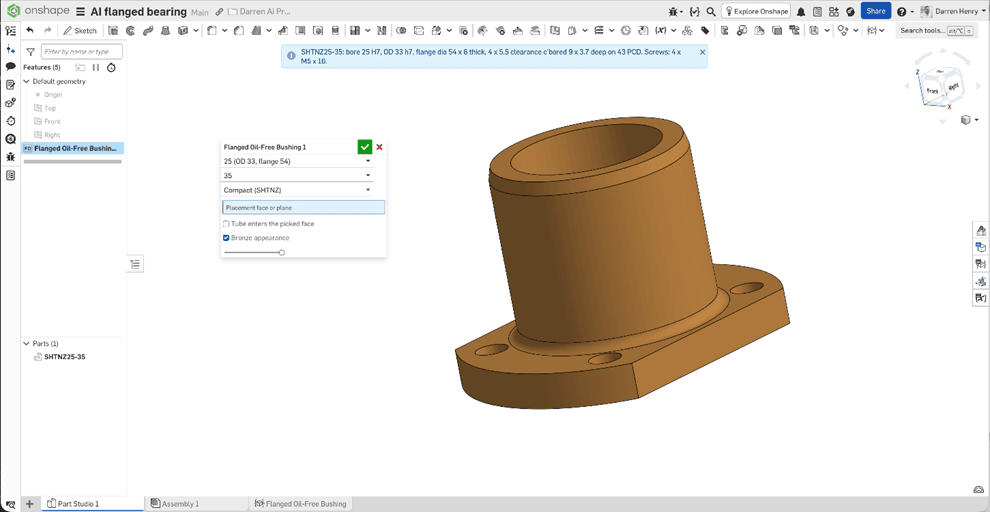
The agent reported back after 34 minutes. In a sandbox it had written about 200 lines of FeatureScript, generated every size in the catalog, checked the parts against the PDF and made itself a size chart. Onshape had a new toolbar command, Flange Oil-Free Bushing. Henry picked a small size, and the dialog offered only the lengths the catalog lists for it. He changed the length from 10 to 20 and the flange from compact to round, and the part rebuilt each time.
Three things in the result were not in his prompt: a blue dialog box, a bronze appearance and a thread callout. The agent keeps notes between projects, and he had asked for those on earlier jobs. "It built not only the geometry, but an intelligent tool," he said.
2. Why go through code
Henry was candid about where text-to-CAD, in which a prompt goes straight to geometry, stands today. Many of the examples shared on social media, he said, are simple and built differently from the way an engineer would build them, so any change means going back to the LLM. "LLMs are really good at coding, but they're poor at understanding geometry relationships like a human does." They miss sketch constraints, spatial relationships, dependencies such as a fillet on an extrude, and relationships between faces.
He illustrated the point with simple shapes. An AI-made washer looks right until you resize it and find the two circles were never set concentric. An AI-made box may not know which edges are coincident, horizontal or vertical. An engineer would put four constraints on the washer and twelve on a rectangular base. A standard sprocket tooth profile needs more than 75, according to his slide, to update correctly.
Onshape's approach is FeatureScript, the language its own developers use to write extrude, shell, fillet and the other standard features, later opened to customers for custom features. "AI loves to code," Henry said, and a feature written in code keeps its logic and parameters. A wave spring, usually a helix with a mathematical curve on top, becomes one feature with its own dialog.
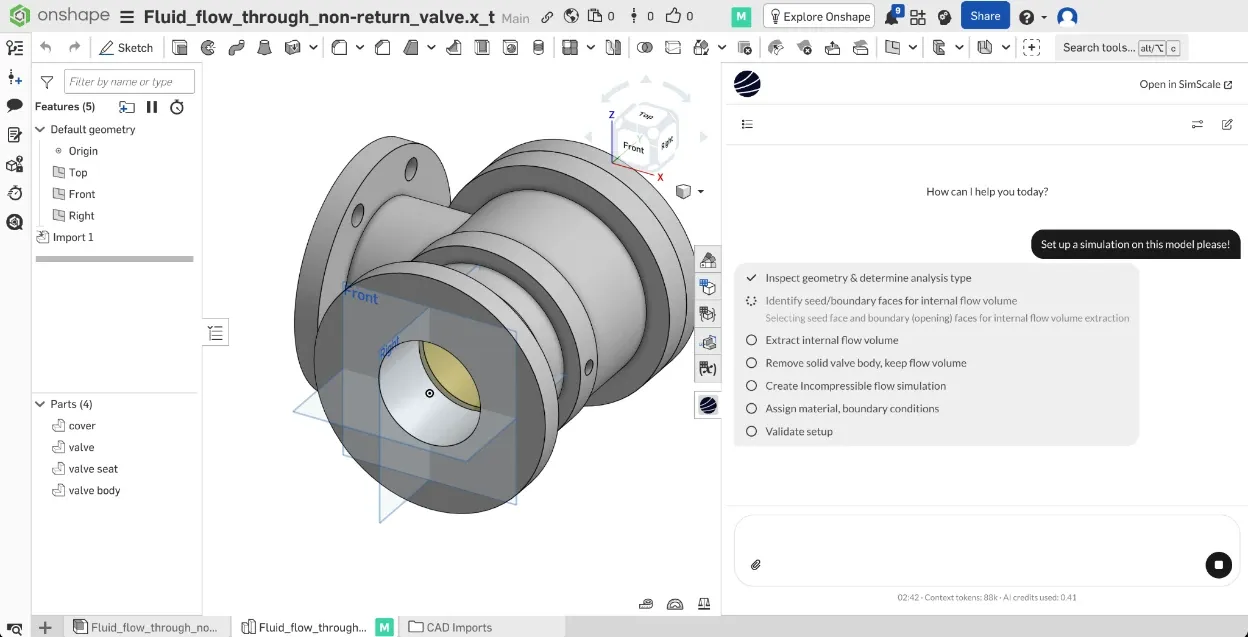
The FeatureScript MCP Server, released August 13 through Onshape Labs and the Onshape App Store, teaches a coding model such as Claude, ChatGPT or Gemini to write FeatureScript. (MCP is the Model Context Protocol.) The model prototypes code, writes and debugs the feature, runs it in Onshape, looks at the result and tries again until it works. "It allows you to do text to geometry," Henry said, "but more importantly, it allows you to customize the CAD system."
3. Sprockets, grilles and wire baskets
The sprocket generator took less than an hour and about 700 lines of code, and draws on Machinery's Handbook and the Martin Sprocket catalog. On screen Henry put hubs on both sides, replaced the set screw with a keyway and went from one strand to three. Then he asked for a 13-tooth sprocket, "which is unheard of," with a one-inch hub and a 0.7 bore. To check the tool, he said, he could have Claude generate 15 variants and compare them with the Martin catalog.
A halftone pattern exported as SVG from the Book of Shapes website became a feature that applies it to any shape, staggered or square, with an adjustable falloff radius; a speaker maker could use it to keep grilles consistent. A phyllotaxis dot pattern like the one on a Nest smoke detector was simplified and made symmetric. Laying out those dots by hand "would be weeks worth of work," he said.
For a hypothetical wire-goods maker he had built a basket tool that sets the hoops and overall size and produces cut and bend lists, plus a wire shelf, a sink rack that recalculates around the drain, and a grill rack.
Some features measure instead of model. One fills a container to a set volume and shows the level. Another treats any shape as ice and finds how it floats; his test shape came out 91.7% submerged, close to the figure for real ice. Henry suggested the same approach for an aircraft maker tracking center of gravity as a fuel tank drains.
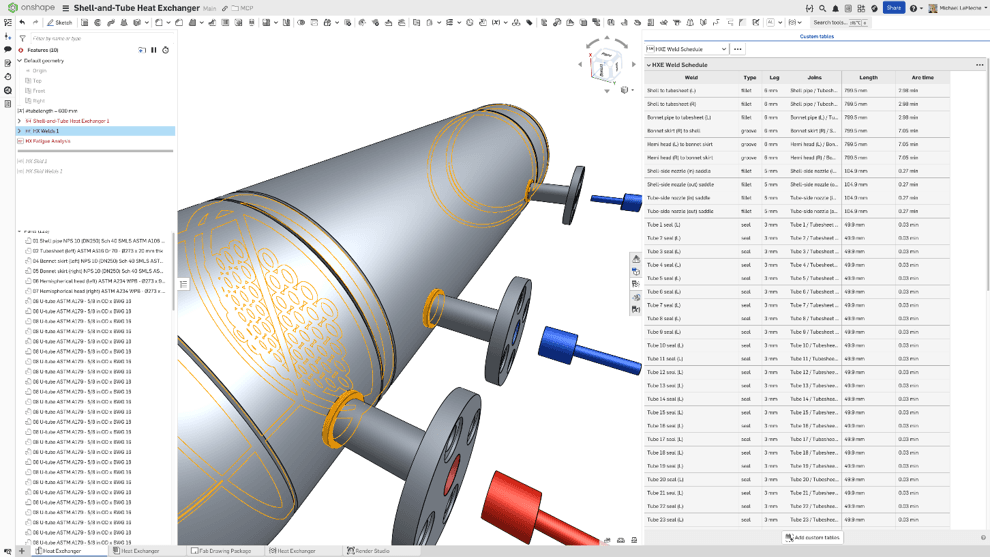
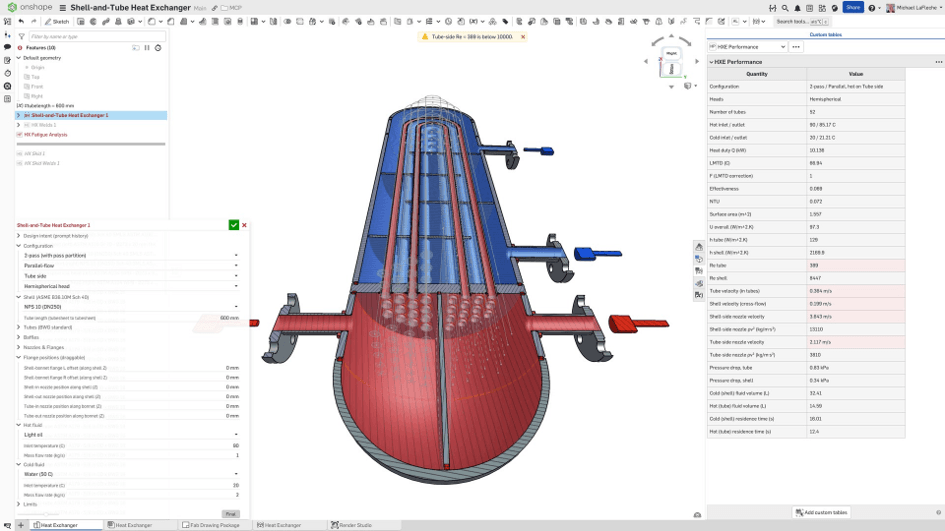
Engineers also use the MCP server to add features Onshape lacks, such as the advanced blends found in Siemens NX or Creo, and to turn geometry modeled by hand into reusable features. The biggest model built with it so far is a heat exchanger of more than 600 components. It took about a day of prompting, and Henry puts the saving at 150 to 200 hours. Finished features are shared across a company like a Google Doc.
4. The rest of Onshape's AI
Henry sorts AI in CAD into five categories. The FeatureScript MCP Server is the fifth, which he says only Onshape offers. Most CAD vendors compete in the other four.
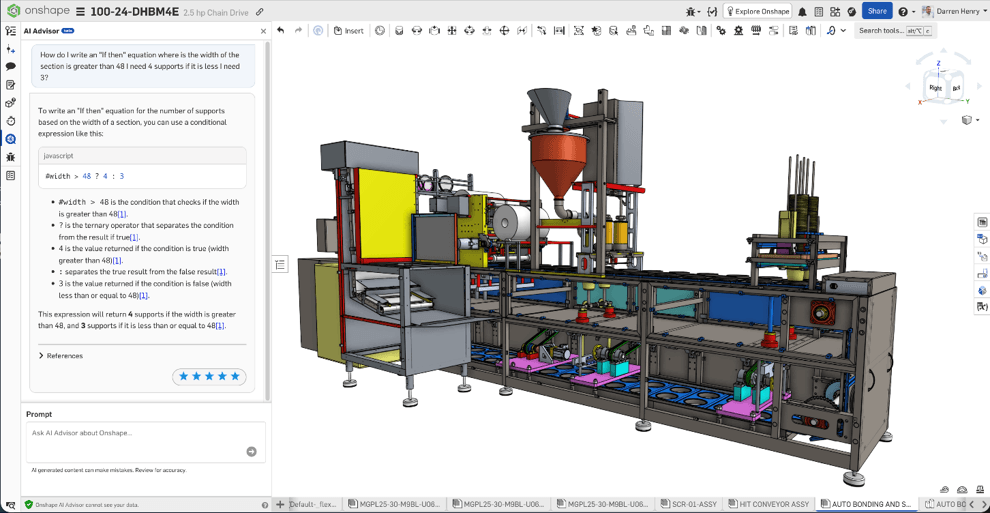
AI Advisor, built with AWS, is a retrieval-augmented assistant inside the product. It knows the software but cannot see the user's model. Henry said it now outpaces all of Onshape's other online help sources by 30%, with questions arriving every second, and that support tickets per user have fallen as the user base has grown. It is re-synced with each Onshape release, every three weeks. He still called it "table stakes."
Replicate Annotations, already shipping, copies dimensions from one drawing view to a similar one and uses machine learning to decide where each attaches.
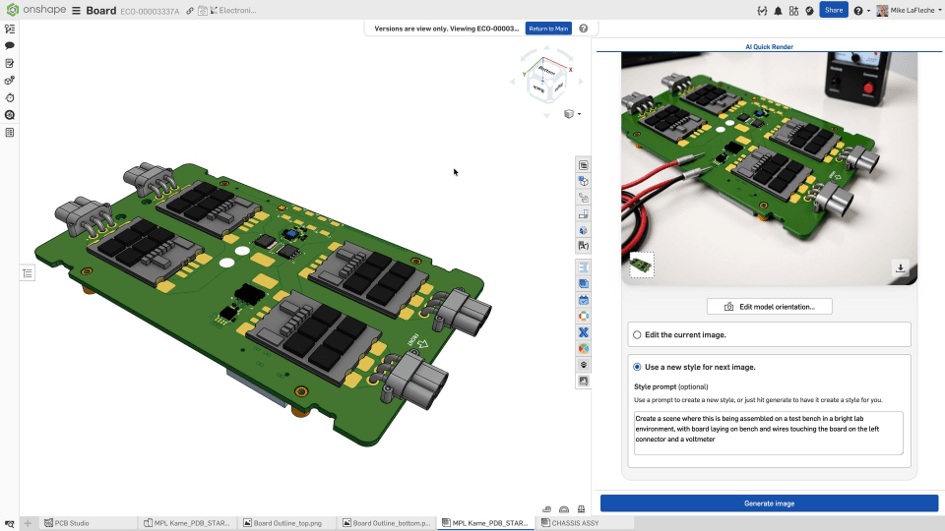
AI Quick Render, in Onshape Labs early access since July, uses a diffusion model to turn the current model view and a prompt into a photographic image, stored in the Onshape document with version history. Henry's example put a robot arm on an electronics technician's bench. "Artists are really good at advanced ray tracing," he said. "This is for everyone and it's quick."
Natural-language agents that read the model have not been released. In a recorded demo Henry asked a trailer model, "How much weight would I save if I switched the fencing from steel to aluminum?" The agent found the fencing parts, read their material and weight and answered 266 pounds, then changed the material and exported the parts as Parasolid. Onshape plans an orchestration agent that hands each request to specialist agents.
Henry tied two things to Onshape running in the cloud. Agents work on Onshape's servers in a separate session while the engineer keeps modeling. And every action is logged, so "everything an AI touches will have a fingerprint on it that lets us know it was AI," and the document can be rolled back to any point before an AI change. In a file-based system, he said, a save after an AI edit leaves only the engineer's name: "You won't know that AI actually did something."
5. Robots
Asked whether this helps early-stage robotics companies, such as seed-stage humanoid and robot-hand teams, Henry said the MCP server is open to every Onshape user, startups included. Onshape has been working on prompt-built cycloidal drives, "which is in every humanoid robotics now." It was not part of this demo.
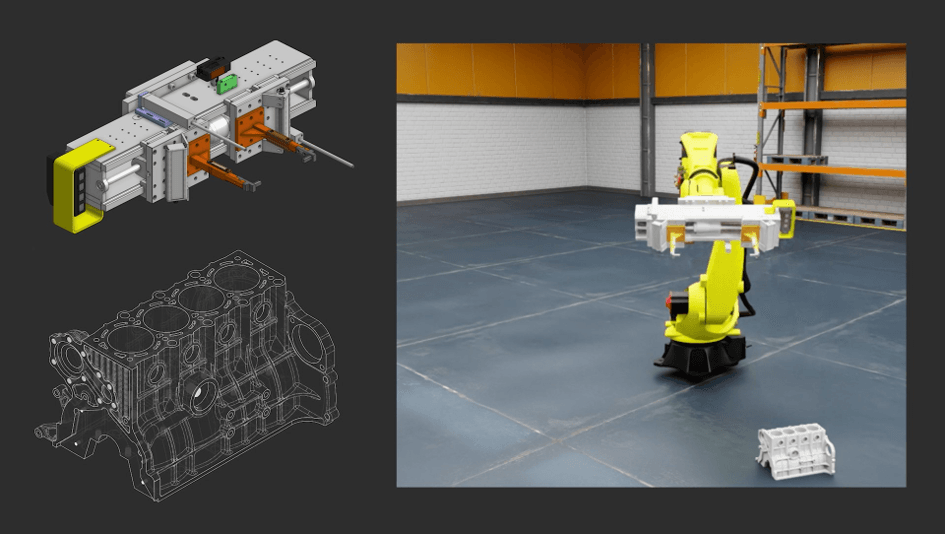
Simulation is the closer link. At NVIDIA GTC on March 17, PTC announced a workflow that sends Onshape models to NVIDIA Isaac Sim, the robot simulator built on Omniverse. Joints, actuators and other physical properties are defined once in Onshape and carried across, and design changes follow. FANUC America is quoted in the announcement, and the workflow is now in Onshape Labs early access. Henry said Onshape mates already record mechanical intent, so the simulator can use them as they are.
In the GTC demo he described, an AI watched an Onshape-designed gripper run in simulation and recommended making it longer. The change was made in Onshape and the model went back into simulation to confirm it. "I think it's going to be an incredible tool for robotics," Henry said.
RobotToday's Leona Tang described Carnegie Mellon spinouts in Pittsburgh that took more than nine months to reach a prototype, turned away by manufacturers because they had papers but no drawings. Henry said he has also built geometry from a hand sketch drawn on his iPad.
6. Review and early buyers
Asked where human review should stay in the process, Henry said at every stage. "Every step that AI touches, I think you need humans to evaluate." Engineering is stricter than marketing copy, he said: "We need humans checking everything." A feature is easier to check than a one-off model because it can be run many times, starting with a shape whose answer is known. Engineers who read code can review the code; others can review the output.
In one case the checking ran the other way. Henry built a feature from a customer's PDF catalog, and the feature turned up errors in the catalog.
The keenest buyers so far are large enterprises, he said, because a feature one engineer writes can be shared with thousands of colleagues. Next come companies whose products follow equations or know-how that can be written down: turbines, wirework, knife serrations, fan cooling, drone propellers. "In the past, you look at the drawings and the models as intellectual property," Henry said. "Now we're looking at these custom features that AI creates as intellectual property."
7. Where things stand
The demos in this article were run by Henry on his own machine, and the build times and the estimate of 150 to 200 hours saved are his figures from those projects.
The FeatureScript MCP Server is available now through Onshape Labs, and AI Quick Render and the Isaac Sim workflow are in early access. Henry said the natural-language agents are coming in the near future. Users bring their own coding model, and a finished feature is plain FeatureScript that runs without one, so the AI is used once, when the tool is built, and the tool can then be used as often as needed.
On quality, Henry's answer is human review at every step, and the bushing shows why the effort pays off: a tool the whole company will use is worth checking carefully once. For robotics teams, the two things to watch are the cycloidal drive work and the Isaac Sim workflow, which puts CAD and simulation in the same loop.
8. Questions for follow-up
How does Onshape measure AI Advisor's 30% lead over its other help sources?
When will natural-language agents reach Onshape Labs, and which tasks come first?
Does the FeatureScript MCP Server have a built-in test harness, for example checking a generated feature against a catalog automatically?
Could Onshape show the cycloidal drive feature in a future demo, and are humanoid or robot-hand teams already using it?
Which robot makers, FANUC America aside, are in the Isaac Sim early-access program?
When a feature is generated from a supplier's catalog, who owns it: the supplier, the customer, or both?


Leave a comment